


iDream Scrolling News Documentation
For Installation Of Template Click here : http://it.idreamgroup.org/2018/11/template-installation.html
How To Setup Scrolling News Demo Template.
Top Navigation
Access your blog Layout > click Edit link on Top Navigation widget.


Social Top Widget/Social Footer Widget
Access your blog Layout > click Edit link on Social Top widget.
Icons Available { facebook, twitter, gplus, rss, youtube, skype, stumbleupon, tumblr, vine, stack-overflow, linkedin, dribbble, soundcloud, behance, digg, instagram, pinterest, delicious, codepen}


Main Menu/ DropDown/ Multi DropDown
Access your blog Layout > click Edit link on Main Menu widget.
Normal Link : Features
Sub Link: _Sub Link 1.0 (before the link add "_") 1 underscore
Sub Link 2: __Sub Link 1.1 (before the link add "__") 2 underscore

Sub Link 2: __Sub Link 1.1 (before the link add "__") 2 underscore

Ticker News
Access your blog Layout > click Add a Gadget > HTML/JavaScript on Ticker News Section, and then add one of the following
- Recent Posts: <span data-type="recent" data-no="5"></span>
- Label / Tag Ex: <span data-type="label" data-label="Sports" data-no="5"></span>


Featured Slider
Access your blog Layout > click Add a Gadget > HTML/JavaScript on Featured Posts Section, and then add one of the following.

- Recent Posts: <span data-type="ty-latest-slide" data-no="6"></span>
- Label / Tag Ex: <span data-type="ty-tag-slide" data-label="Sports" data-no="6"></span>
Image Example:

Access your blog Layout > click Add a Gadget > HTML/JavaScript on Featured Posts Section, and then add one of the following.

- Recent Posts: <span data-type="ty-latest-slide" data-no="6"></span>
- Label / Tag Ex: <span data-type="ty-tag-slide" data-label="Sports" data-no="6"></span>
Image Example:

Featured Post
Access your blog Layout > click Add a Gadget > HTML/JavaScript on Featured Posts Section, and then add one of the following.
- Post Grid (Max 3 Posts): <span data-type="tyard" data-label="Break"></span>
Replace Break With Your Own Label.
Image Example:
Image Example:
Custom Widgets
Access your blog Layout > click Add a Gadget > HTML/JavaScript on Sidebar or Footer section, you must place the following codes highlighted in blue below.
- Recent Post
Recent Posts: <span class="latestposts" data-no="5"></span>

- Label Posts
Post Per Tag: <span class="tagpost" data-label="Break" data-no="5"></span>

- Recent Comments
Recent Comments: <span class="latestcomments" data-no="5"></span>
 After add, click save.
Access your blog Layout > click Add a Gadget > HTML/JavaScript on Sidebar or Footer section, you must place the following codes highlighted in blue below.
- Recent Post
Recent Posts: <span class="latestposts" data-no="5"></span>

- Label Posts
Post Per Tag: <span class="tagpost" data-label="Break" data-no="5"></span>
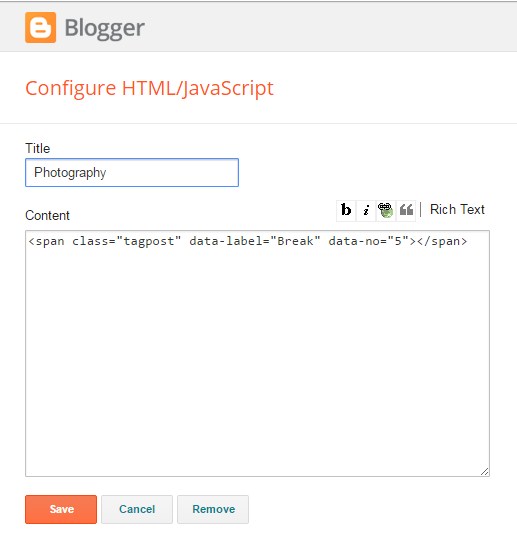
- Recent Comments
Recent Comments: <span class="latestcomments" data-no="5"></span>

After add, click save.
Comments System
Access your blog Layout > click Edit link on Comments System widget.
Add one of the following provisions
- [blogger] for blogger comments
- [facebook] for facebook comments
- [disqus] for disqus comments
you can add one system, two or three as you like and with arrangement you want for example
[facebook]
[disqus]
[facebook][disqusss]
[blogger][facebook]
[facebook][blogger]
[disqus][facebook][blogger]
[blogger][disqus][facebook]
Add one of the following provisions
- [blogger] for blogger comments
- [facebook] for facebook comments
- [disqus] for disqus comments
you can add one system, two or three as you like and with arrangement you want for example
[facebook]
[disqus]
[facebook][disqusss]
[blogger][facebook]
[facebook][blogger]
[disqus][facebook][blogger]
[blogger][disqus][facebook]
Disqus Shortname
Access your blog Layout > click Edit link on Disqus Shortname widget.
What you have to do is just add the shortname
What you have to do is just add the shortname
Facebook Page Plugin:
<center><div class="fb-padding"><div id="fb-root"></div>
<script>(function(d, s, id) {
var js, fjs = d.getElementsByTagName(s)[0];
if (d.getElementById(id)) return;
js = d.createElement(s); js.id = id;
js.src = "//connect.facebook.net/pt_BR/sdk.js#xfbml=1&version=v2.3&appId=1395743857335531";
fjs.parentNode.insertBefore(js, fjs);
}(document, 'script', 'facebook-jssdk'));</script>
<div class="fb-page" data-href="https://www.facebook.com/templatesyard" data-width="280" data-height="230" data-hide-cover="false" data-show-facepile="true" data-show-posts="false"><div class="fb-xfbml-parse-ignore"></div></div></div></center>
or you can follow this tutorial if above method won't work
<center><div class="fb-padding"><div id="fb-root"></div>
<script>(function(d, s, id) {
var js, fjs = d.getElementsByTagName(s)[0];
if (d.getElementById(id)) return;
js = d.createElement(s); js.id = id;
js.src = "//connect.facebook.net/pt_BR/sdk.js#xfbml=1&version=v2.3&appId=1395743857335531";
fjs.parentNode.insertBefore(js, fjs);
}(document, 'script', 'facebook-jssdk'));</script>
<div class="fb-page" data-href="https://www.facebook.com/templatesyard" data-width="280" data-height="230" data-hide-cover="false" data-show-facepile="true" data-show-posts="false"><div class="fb-xfbml-parse-ignore"></div></div></div></center>
Author Profile Details
Access your blog Layout > click Add a Gadget > HTML/JavaScript on Post Author Details section, you must place the codes in the blank space.

Access your blog Layout > click Add a Gadget > HTML/JavaScript on Post Author Details section, you must place the codes in the blank space.

Author Social Widget
Go to your blogger dashboard > Layout > click Edit link on Author Social widget.
In the "New Site Name" field replace the word "facebook" with any social media website (twitter, youtube, google-plus, etc...).
Note: keep in mind that this template uses the "Font Awesome" service for the icons.
Follow this link for the complete set of icons that this service provides:

Go to your blogger dashboard > Layout > click Edit link on Author Social widget.
In the "New Site Name" field replace the word "facebook" with any social media website (twitter, youtube, google-plus, etc...).
Note: keep in mind that this template uses the "Font Awesome" service for the icons.
Follow this link for the complete set of icons that this service provides:

Footer Navigation
Access your blog Layout > click Edit link on Topnav widget.
 it automatically picks pages and page links but in case it doesn't pick, please see the above image to add one, you can also add external links(Links from somewhere else).
Access your blog Layout > click Edit link on Topnav widget.

it automatically picks pages and page links but in case it doesn't pick, please see the above image to add one, you can also add external links(Links from somewhere else).
Shortcodes
- Full Width Post;
Go to Pages or Posts > New Page or Post
On the new page content/post content after adding the page/post title, add the [full_width] code in the page content area.
- Left Sidebar;
Go to Pages or Posts > New Page or Post
On the new page content/post content after adding the page/post title, add the [left_sidebar] code in the page content area.
- Right Sidebar;
Go to Pages or Posts > New Page or Post
On the new page content/post content after adding the page/post title, add the [right_sidebar] code in the page content area.
- Full Width Post;
Go to Pages or Posts > New Page or Post
On the new page content/post content after adding the page/post title, add the [full_width] code in the page content area.
- Left Sidebar;
Go to Pages or Posts > New Page or Post
On the new page content/post content after adding the page/post title, add the [left_sidebar] code in the page content area.
- Right Sidebar;
Go to Pages or Posts > New Page or Post
On the new page content/post content after adding the page/post title, add the [right_sidebar] code in the page content area.
Theme Option
Boxed Width Version(trure/false):
- Add (true) to Boxed, to return the Full version just add (false)
- Add (true) to Boxed, to return the Full version just add (false)
PageNavi Results No:
- Type your number for Page Navigation, Default is "6"
- Type your number for Page Navigation, Default is "6"
Theme Colors
Access your blog Template > click Customize.
Here is where you can change the main color of the model, using your favorite colors.

Here is where you can change the main color of the model, using your favorite colors.

What is SEO?
What is SEO?

Search engine optimization (SEO) is the practice of increasing the quantity and quality of traffic to your website through organic search engine results.
What goes into SEO?
To understand what SEO really means, let's break that sentence down and look at the parts:
- Quality of traffic. You can attract all the visitors in the world, but if they're coming to your site because Google tells them you're a resource for Apple computers when really you're a farmer selling apples, that is not quality traffic. Instead you want to attract visitors who are genuinely interested in products that you offer.
- Quantity of traffic. Once you have the right people clicking through from those search engine results pages (SERPs), more traffic is better.
- Organic results. Ads make up a significant portion of many SERPs. Organic traffic is any traffic that you don't have to pay for.
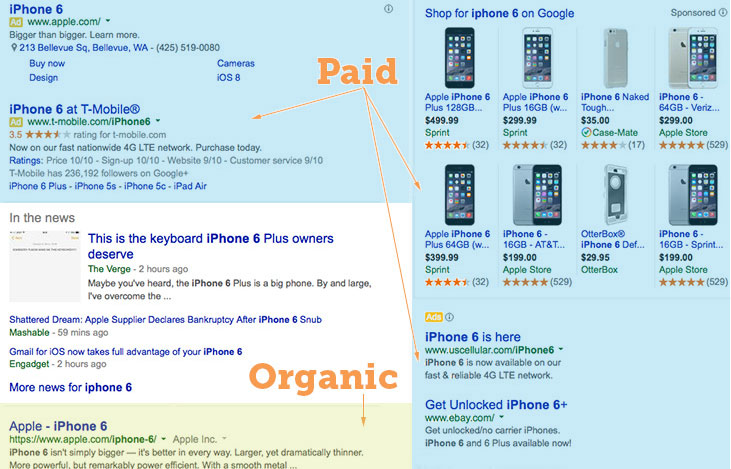
Organic search traffic is specifically any unpaid traffic that comes from SERPs.
How SEO works
You might think of a search engine as a website you visit to type (or speak) a question into a box and Google, Yahoo!, Bing, or whatever search engine you're using magically replies with a long list of links to webpages that could potentially answer your question.
That's true. But have you ever stopped to consider what's behind those magical lists of links?
Here's how it works: Google (or any search engine you're using) has a crawler that goes out and gathers information about all the content they can find on the Internet. The crawlers bring all those 1s and 0s back to the search engine to build an index. That index is then fed through an algorithm that tries to match all that data with your query.
There are a lot of factors that go into a search engine's algorithm, and here's how a group of experts ranked their importance:
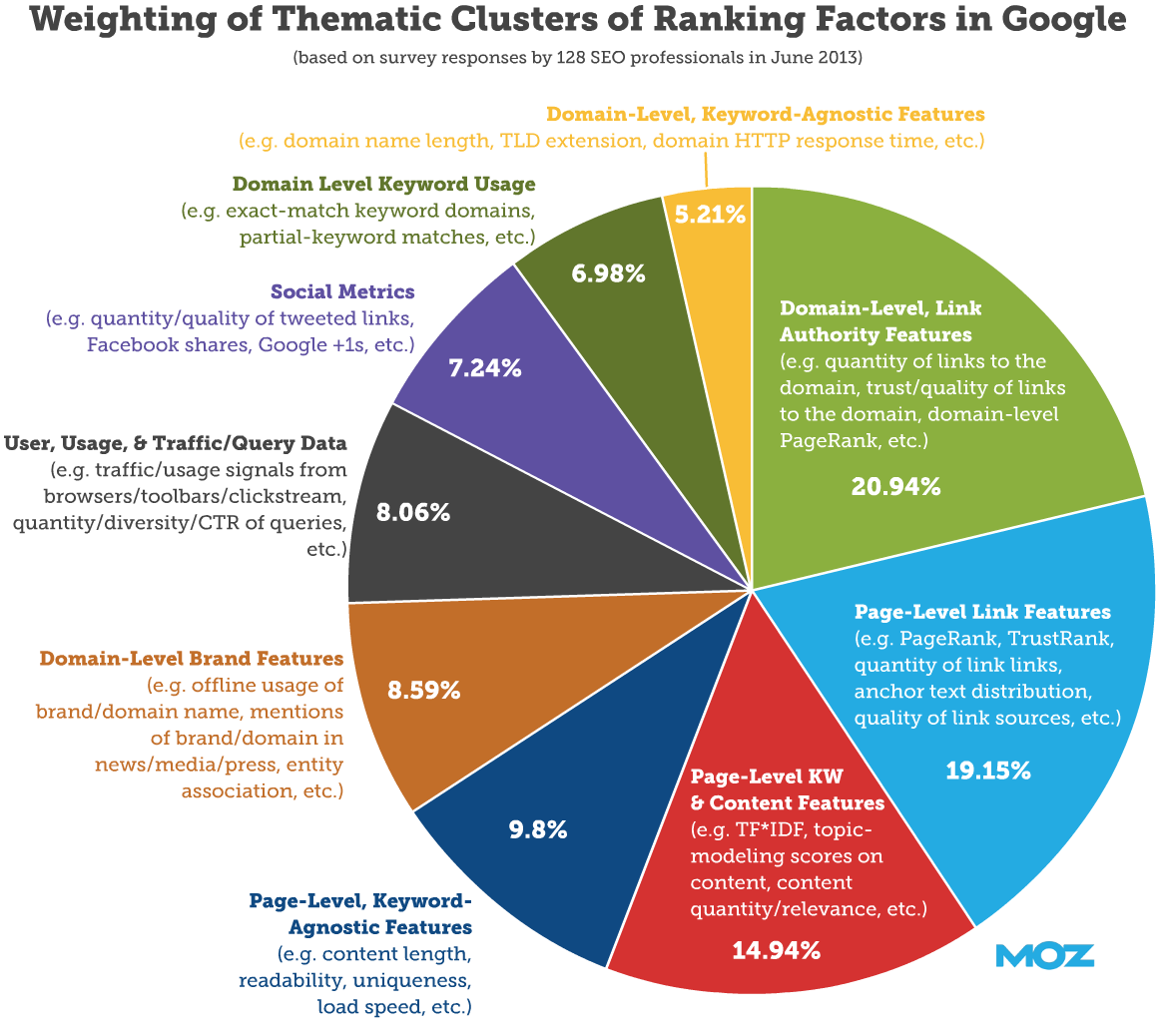
That's all the SE (search engine) of SEO.
The O part of SEO—optimization—is where the people who write all that content and put it on their sites are gussying that content and those sites up so search engines will be able to understand what they're seeing, and the users who arrive via search will like what they see.
Optimization can take many forms. It's everything from making sure the title tags and meta descriptions are both informative and the right length to pointing internal links at pages you're proud of.
Learning SEO
This section of our site is here to help you learn anything you want about SEO. If you're completely new to the topic, start at the very beginning and read the Beginner's Guide to SEO. If you need advice on a specific topic, dig in wherever suits you.
Here's a general overview:
Building an SEO-friendly site
Once you're ready to start walking that SEO walk, it's time to apply those SEO techniques to a site, whether it's brand new or an old one you're improving.
These pages will help you get started with everything from selecting an SEO-friendly domain name to best practices for internal links.
Content and related markup
A site isn't really a site until you have content. But SEO for content has enough specific variables that we've given it its own section. Start here if you're curious about keyword research, how to write SEO-friendly copy, and the kind of markup that helps search engines understand just what your content is really about.
On-site topics
You've already learned a lot about on-site topics by delving into content and related markup. Now it's time to get technical with information about robots.txt.
Link-related topics
Dig deep into everything you ever needed to know about links from anchor text to redirection. Read this series of pages to understand how and when to use nofollow and whether guest blogging is actually dead. If you're more into the link building side of things (working to improve the rankings on your site by earning links), go straight to the Beginner's Guide to Link Building.
Other optimization
Congratulations! You've mastered the ins and outs of daily SEO and are now ready for some advanced topics. Make sure all that traffic has the easiest time possible converting with conversion rate optimization (CRO), then go micro level with local SEO or take that site global with international SEO.
The evolution of SEO
Search engine algorithms change frequently and SEO tactics evolve in response to those changes. So if someone is offering you SEO advice that doesn't feel quite right, check in with the specific topic page.
For a more technical look at SEO, check out this short video from Rand Fishkin.
Go forth and SEO…
Keep learning
Subscribe to:
Posts
(
Atom
)


